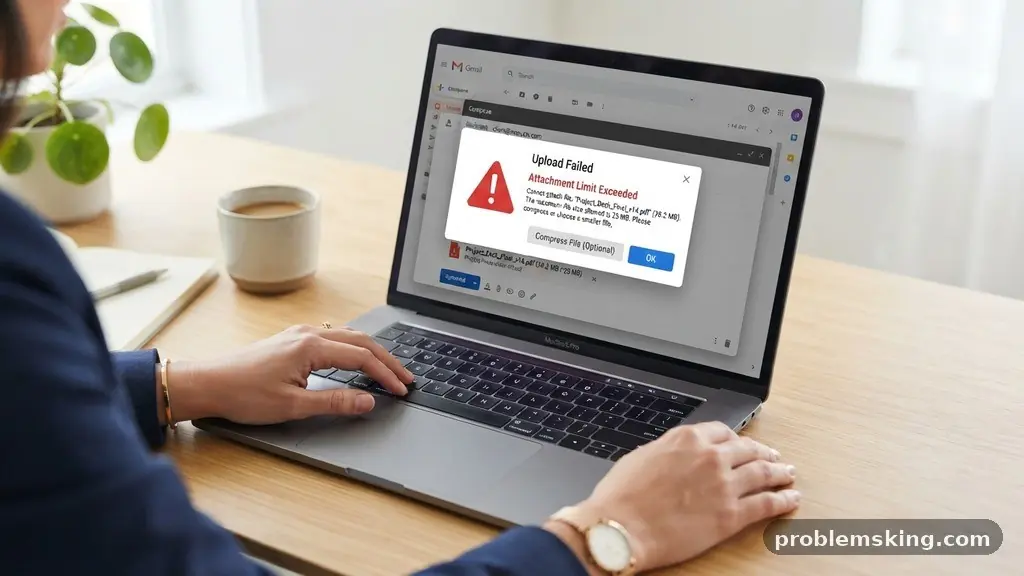
Finding effective methods for making Large Files Easier to Share When Email Attachments Are Too Big is essential for anyone dealing with high-resolution media or complex project documents. Most email providers cap attachments at 20MB to 25MB, which often leaves users stuck with bounce-back errors. By leveraging modern cloud infrastructure and optimized transmission protocols, you can bypass these restrictions entirely while maintaining data integrity.
This article provides practical, actionable strategies for moving heavy digital assets without hitting your inbox limits, ensuring your recipient receives the files exactly as intended. You will learn how to transition from traditional mailing to more efficient, professional workflows that save time and reduce technical frustration.
Understanding Email Attachment Limitations
The primary reason you struggle to send large files is the architecture of the Simple Mail Transfer Protocol (SMTP). Designed in the early 1980s, SMTP was never intended to handle the gigabyte-sized files common in modern professional environments. Most major providers, such as Gmail and Outlook, enforce a 25MB maximum attachment size to prevent server congestion and maintain consistent performance.
When you attempt to attach a file larger than this limit, the system triggers a rejection notice before the email even leaves your outbox. This occurs because the data must be encoded into a text-based format known as Base64. This encoding process typically increases the file size by roughly 33%, meaning a 20MB file might actually occupy 27MB during transmission.
Beyond the raw size, there are inherent risks in sending massive files directly through email. Heavy attachments consume significant storage quota on both the sender’s and recipient’s servers. If your recipient has a limited mailbox, your message could trigger a storage warning, potentially blocking their ability to receive other incoming mail.
Leveraging Cloud Storage Solutions
Cloud storage is the most reliable alternative for sharing bulky data. Services like Google Drive, Dropbox, and OneDrive allow you to upload a file to a remote server and then share a link rather than the actual binary data. This approach completely bypasses the 25MB attachment limit.
When you share a file via a cloud link, you are not sending the file itself; you are sending a reference to its location. This enables cloud synchronization, where changes made to the file are immediately available to the recipient without needing to re-send the document. It is a more professional and efficient way to collaborate on living projects.
These platforms also provide granular control over access. You can decide if the recipient has “view-only” access or “editor” permissions. This adds a layer of security that traditional email attachments simply cannot offer, as you can revoke access at any time if a file was sent to the wrong person.
The Mechanics of File Compression
Before you upload or transfer a file, reducing its footprint is a smart first step. File compression works by identifying redundant patterns in data and replacing them with shorter representations. This process is highly effective for documents, spreadsheets, and source code, though it has limited impact on already-compressed files like JPEGs or MP4s.
Creating a ZIP archive is the standard way to package multiple related files into a single container. By grouping your assets, you ensure that the recipient receives the entire project structure in one go. Modern operating systems can create these archives with a simple right-click, requiring no specialized software.
However, do not expect miracles with multimedia. If you are trying to shrink a 500MB video file using standard compression, the result might only be a few megabytes smaller. In these cases, it is far better to use a dedicated file hosting service rather than relying on compression to squeeze the file into an email.
Dedicated File Hosting Services
For one-off transfers where you do not want to manage a cloud storage account, dedicated file hosting services are an excellent choice. Platforms like WeTransfer or SwissTransfer are designed specifically for sending large files via a direct download link. These services act as a temporary bridge for your data.
Most of these tools work by uploading your file to their servers and emailing a link to your contact. Once the recipient clicks the link, they download the file directly to their machine. This avoids the overhead of email servers entirely, making it one of the most effective ways for making Large Files Easier to Share When Email Attachments Are Too Big.
Many of these providers offer free tiers that allow for file transfers up to 2GB, which is more than enough for most presentations or high-resolution image sets. Some even offer added benefits like password protection, which ensures that only the intended recipient can access the data, even if the link is intercepted or shared accidentally.
Comparing Transfer Methods
Choosing the right tool depends on your specific needs, such as file size, security requirements, and the need for future access. The table below outlines how different methods compare in terms of capacity and convenience.
| Method | Typical Capacity | Best For |
|---|---|---|
| Email Attachment | 25MB | Small documents, text files |
| Cloud Storage Link | 15GB+ | Ongoing collaboration, large archives |
| File Transfer Service | 2GB – 20GB | One-time transfers, quick sharing |
| Encrypted Cloud Drive | Variable | Sensitive or confidential data |
Security and Encrypted Sharing
When dealing with sensitive information, simply sending a link is not enough. You must consider the security of the transmission. Encrypted file sharing ensures that even if a file is intercepted, it remains unreadable without the proper decryption key.
Many enterprise-grade cloud platforms provide end-to-end encryption by default. This means that even the service provider cannot see the contents of your files. When sending highly confidential documents, look for services that support two-factor authentication for the download link.
Setting an expiration date on your links is another vital security practice. By ensuring a link becomes inactive after 7 or 30 days, you reduce the window of opportunity for unauthorized access. This is particularly useful when sending sensitive data to external contractors or temporary project partners.
Managing Bandwidth and Connectivity
Large file transfers can be taxing on your internet connection, especially if you have slow upload speeds. If you are uploading a 10GB file, your connection might experience bandwidth throttling, where your ISP slows down your upload speed to manage network traffic. This can result in long wait times or failed uploads.
To mitigate this, try to perform large uploads during off-peak hours when network traffic is lower. Additionally, use a stable wired connection rather than Wi-Fi whenever possible. If an upload does fail, many modern browsers and desktop sync clients support “resume” functionality, so you do not have to restart from 0%.
For extremely large datasets, consider using a peer-to-peer transfer protocol. These systems allow files to be sent directly from your computer to the recipient’s machine without passing through a central server. This can be significantly faster and more secure for massive video files or raw data sets.
Frequently Asked Questions
Why does my email client say the file is too big even though it is under 25MB?
Email systems use Base64 encoding to transmit attachments, which adds about 33% to the file’s size. If your file is 20MB, the encoded version could exceed the server’s 25MB limit. It is best to keep attachments under 15MB to ensure they pass through mail filters successfully.
Is it safe to use free file hosting sites?
Most reputable free file hosting services are safe, but you should always review their privacy policies. Avoid sites that require you to install proprietary software or browser extensions. Stick to web-based interfaces that allow you to upload and generate a link without invasive downloads.
What is the most secure way to send confidential files?
The most secure method is to use a platform that offers end-to-end encryption and allows you to set an expiration date on the link. For maximum security, you can also password-protect the file itself using tools like 7-Zip before uploading it to a secure cloud folder.
Can I send large files to someone without an account?
Yes, most cloud storage services and dedicated file transfer sites allow the recipient to download files without creating an account. This removes friction for your recipient and ensures that the sharing process remains simple and professional.
How do I know if my recipient has received the file?
Many professional cloud storage and file transfer services provide delivery notifications or tracking logs. These logs tell you exactly when the link was accessed, which can be useful for project management and ensuring your files have arrived safely.
Best Practices for Professional Sharing
Professionalism is key when you are handling large files. Always include a brief note in your email explaining why you are providing a link instead of an attachment. This manages expectations and prevents the recipient from worrying that the link might be malicious.
Organize your files logically before sending them. If you are sharing a folder, ensure it is named clearly and that the files inside follow a consistent naming convention. You can find more information on data management and security at the National Institute of Standards and Technology.
Finally, always test your link before sending it. Open it in an “incognito” or “private” browser window to ensure that the permissions are set correctly and that the file is publicly accessible to the intended recipient. By following these steps, you will master the process of making Large Files Easier to Share When Email Attachments Are Too Big, ensuring your digital communications remain smooth and effective.